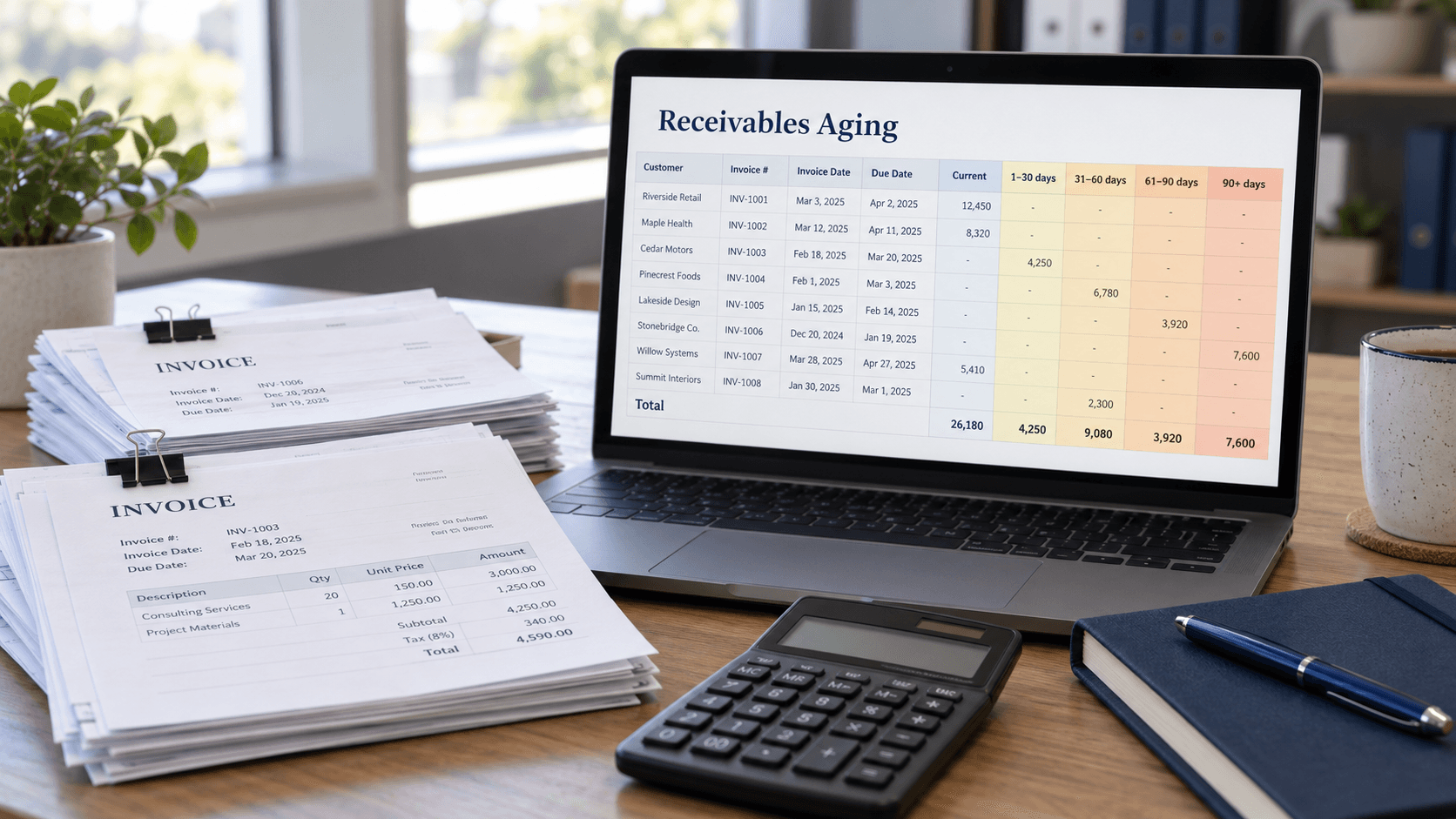
An accounts receivable aging report organizes unpaid customer invoices according to how long they have remained outstanding or overdue. It helps businesses identify late payments, monitor collection performance, and evaluate potential credit losses before unpaid balances become serious financial problems.
For wholesalers, distributors, manufacturers, and service providers, accounts receivable may represent a substantial portion of current assets. Selling products on credit can support revenue growth, but delayed collections can also restrict purchasing capacity, reduce liquidity, and increase reliance on external financing.
An aging report provides a structured view of these risks. Instead of looking only at the total amount customers owe, managers can distinguish recently issued invoices from payments that are significantly past due.
What Is an Accounts Receivable Aging Report?
An accounts receivable aging report is a financial schedule that groups outstanding customer balances into aging categories. The report commonly identifies individual customers, unpaid invoices, outstanding amounts, due dates, and the number of days an invoice has been outstanding or overdue.
Most reports use aging buckets such as current, 1–30 days overdue, 31–60 days overdue, 61–90 days overdue, and more than 90 days overdue. However, some systems classify invoices according to time elapsed since the invoice date instead of days past due.
This distinction matters because an invoice issued 45 days ago with 60-day payment terms is not yet overdue. A report based on invoice age may classify it differently from one based on contractual payment dates.
Why Accounts Receivable Aging Matters
Accounts receivable aging allows businesses to distinguish normal credit exposure from emerging payment problems. The total receivables balance alone cannot show whether customers are paying within agreed terms.
A business might report $200,000 in receivables and assume its collection position is healthy. If $120,000 of that amount is more than 90 days overdue, the company may face substantial collection and liquidity risks.
By identifying overdue balances, the report helps finance teams prioritize follow-up actions, review customer credit limits, evaluate doubtful accounts, and improve cash flow forecasting.
Accounts Receivable Aging Report Example
An accounts receivable aging report typically presents each customer's unpaid balance across defined aging buckets. The following example uses days past due, with a separate current category for invoices not yet overdue.
The company has $45,000 in total outstanding receivables. Of that amount, $28,000 is overdue, and $8,000 is more than 90 days late.
The report also shows that Customer D represents the oldest payment exposure, while Customer A has a comparatively small overdue balance. Collection priorities should consider these differences along with customer circumstances and contractual terms.
How to Interpret Aging Buckets
Aging buckets indicate the duration of payment delays and help managers organize collection activities. The exact thresholds should match the business's credit policies and payment terms.
These categories do not establish universal probabilities of default. A long-overdue invoice may involve a dispute, administrative error, or temporary customer liquidity problem rather than an unrecoverable debt.
| Aging Bucket | Meaning | Typical Management Focus |
|---|---|---|
| Current | Invoice not yet due | Routine monitoring |
| 1–30 days overdue | Recently missed payment | Reminder and payment confirmation |
| 31–60 days overdue | Extended delay | Direct customer follow-up |
| 61–90 days overdue | Significant delay | Escalation and credit review |
| 90+ days overdue | Long-standing unpaid balance | Intensive collection and recovery assessment |
How to Create an Accounts Receivable Aging Report
Creating an accounts receivable aging report requires accurate invoice information, payment allocations, due dates, and a clearly defined reporting date. The report should exclude settled invoices and properly account for partial payments and credit notes.
Step 1: Choose the Reporting Date
Select the date on which the receivables position will be evaluated. For example, a month-end report dated October 31 should reflect the outstanding amounts and applicable payment status as of that date.
A consistent reporting date helps businesses compare monthly trends. If reports are generated at irregular intervals, apparent changes in overdue balances may reflect timing differences rather than meaningful collection performance.
Step 2: Gather Outstanding Invoice Data
Collect invoice numbers, customer names, invoice dates, due dates, original amounts, payments received, and remaining balances. Make sure credit memos and adjustments are reflected correctly.
For partially paid invoices, the aging report should show only the unpaid portion. Including the original invoice amount after a partial payment would overstate receivables and distort collection priorities.
Step 3: Calculate Days Past Due
Days past due is the number of calendar days between the reporting date and an invoice's due date when the invoice is overdue.
The formula is:
Days Past Due = MAX(0, Reporting Date − Invoice Due Date)
For example, an invoice due on September 15 and still unpaid on October 15 is 30 days past due.
An invoice due on November 10 is not overdue on October 31, even though it may have been issued several weeks earlier.
Step 4: Assign Aging Categories
Place each outstanding invoice in the appropriate bucket using its calculated days past due. Use mutually exclusive categories so that an invoice appears in only one aging column.
For example, a report might use Current, 1–30, 31–60, 61–90, and 91+ days overdue. This convention should remain consistent across reporting periods.
Step 5: Calculate Customer and Company Totals
Sum unpaid invoices by customer and aging category. Compare the overall total with the accounts receivable control account in the general ledger.
Differences may indicate unallocated payments, missing invoices, duplicate transactions, or incorrect credit adjustments. Reconciliation is an important step before relying on the report for financial decisions.
How to Create an Accounts Receivable Aging Report in Excel
An Excel accounts receivable aging report can calculate overdue days automatically and classify invoices using formulas. This approach works well for businesses that do not yet use a dedicated accounting reporting system.
A basic spreadsheet can include these columns:
Enter the reporting date in cell L1.
Excel Formula for Outstanding Balance
Outstanding balance is the original invoice amount less payments and credits applied to it.
In G2, use:
=MAX(0,E2-F2)
This formula assumes F2 contains the total payments and credits that reduce the invoice. Credit balances or overpayments should be investigated and recorded appropriately rather than silently ignored.
Excel Formula for Days Past Due
Days past due should be calculated from the contractual due date rather than the invoice date when using a past-due report.
In H2, use:
=MAX(0,L1-D2)
The formula returns zero when the invoice is not yet overdue.
Excel Formula for Aging Categories
Excel can classify each unpaid invoice automatically using nested IF statements.
In I2, use:
=IF(G2<=0,"Paid",IF(D2>=L1,"Current",IF(H2<=30,"1-30",IF(H2<=60,"31-60",IF(H2<=90,"61-90","91+")))))
This example uses <= for comparisons inside the Excel formula and classifies invoices due on the reporting date as current.
After copying the formulas down, create a PivotTable using customer names as rows, aging categories as columns, and outstanding balances as values.
The resulting table provides a customer-level aging report that can be filtered, summarized, and refreshed when new invoice data becomes available.
| Column | Field |
|---|---|
| A | Customer |
| B | Invoice Number |
| C | Invoice Date |
| D | Due Date |
| E | Original Amount |
| F | Payments and Credits |
| G | Outstanding Balance |
| H | Days Past Due |
| I | Aging Bucket |
How to Analyze Accounts Receivable Aging
Accounts receivable aging analysis should consider both the absolute amount of overdue invoices and the proportion of total receivables affected. A $20,000 overdue balance may be relatively small for one business but financially significant for another.
Percentage of Overdue Receivables
The formula is:
Overdue Receivables % = Overdue AR ÷ Total AR × 100
Using the earlier example:
Overdue AR = $28,000
Total AR = $45,000
Overdue Percentage = $28,000 ÷ $45,000 × 100 = 62.2%
This indicates that approximately 62.2% of the company's outstanding receivables are past due. Management should investigate whether the concentration reflects individual customers, recurring disputes, unrealistic payment terms, or weak collection procedures.
Percentage of Receivables Over 90 Days
The percentage of receivables more than 90 days overdue helps identify the concentration of older payment exposure.
The formula is:
90+ Days AR % = AR Over 90 Days ÷ Total AR × 100
Using the sample report:
$8,000 ÷ $45,000 × 100 = 17.8%
The company has approximately 17.8% of its receivables in the oldest aging category. This does not establish that the entire balance will become uncollectible, but it warrants detailed review.
Accounts Receivable Aging vs Days Sales Outstanding
Accounts receivable aging examines the age of individual outstanding balances, while days sales outstanding (DSO) estimates the average collection period. Both metrics support credit management, but they provide different perspectives.
A common DSO formula is:
DSO = Average Accounts Receivable ÷ Net Credit Sales × Days in Period
Suppose a company has average accounts receivable of $75,000 and annual net credit sales of $600,000.
DSO = $75,000 ÷ $600,000 × 365 = 45.6 days
The business takes approximately 46 days to collect credit sales under this simplified calculation.
DSO provides a summary collection indicator, while an aging report identifies the specific customers and invoices creating payment delays.
| Metric | AR Aging Report | DSO |
|---|---|---|
| Main focus | Outstanding invoices | Overall collection period |
| Level of detail | Customer and invoice | Company or segment |
| Typical output | Aging buckets | Number of days |
| Primary use | Collection prioritization | Collection efficiency analysis |
| Main limitation | Snapshot of unpaid balances | Can conceal individual overdue accounts |
Accounts Receivable Aging and Bad Debt Allowances
Accounts receivable aging can support estimates of expected credit losses or doubtful accounts. Older receivables may warrant greater attention because collection uncertainty can increase over time.
Under applicable accounting standards, companies may use historical loss experience, current conditions, and forward-looking information to estimate credit losses. The specific requirements depend on the reporting framework, including US GAAP or IFRS.
For illustration, a company might use the following hypothetical loss assumptions:
The estimated allowance in this hypothetical calculation is $6,140. These percentages are examples only and should not be treated as standard industry default rates.
Businesses must select and document loss estimates that reflect their own evidence and applicable accounting requirements.
| Aging Category | Outstanding Balance | Illustrative Loss Rate | Estimated Loss |
|---|---|---|---|
| Current | $17,000 | 1% | $170 |
| 1–30 days | $7,000 | 3% | $210 |
| 31–60 days | $7,000 | 8% | $560 |
| 61–90 days | $6,000 | 20% | $1,200 |
| 91+ days | $8,000 | 50% | $4,000 |
| Total | $45,000 | $6,140 |
How to Improve Accounts Receivable Collections
Improving accounts receivable performance requires accurate invoicing, consistent credit policies, and early communication with customers. Collection management should begin before invoices become severely overdue.
Send Invoices Promptly and Accurately
Issue invoices according to the agreed billing schedule and confirm that customer details, purchase-order references, prices, and payment instructions are correct. Administrative errors can delay approval even when customers are willing to pay.
Review disputed invoices separately from ordinary late payments. Resolving billing problems quickly often improves collection outcomes without escalating the commercial relationship unnecessarily.
Establish Clear Payment Terms
Specify payment due dates, accepted payment methods, credit limits, and any contractual late-payment provisions. Ensure that terms are communicated before goods or services are delivered.
Businesses should also monitor whether payment terms remain appropriate for customers with changing financial or purchasing behavior.
Introduce a Collection Follow-Up Schedule
Use an organized communication process based on due dates and customer circumstances.
The process should comply with relevant contracts and legal requirements. Businesses should avoid aggressive or misleading collection tactics.
Review Customer Credit Limits
Customer credit limits should reflect payment history, financial risk, and the business's capacity to finance outstanding balances. Customers with repeated payment delays may require tighter terms or additional review.
Credit management should also consider commercial relationships. A single disputed invoice does not necessarily justify ending an otherwise productive customer relationship.
| Timing | Example Action |
|---|---|
| Before due date | Courtesy payment reminder |
| 1–7 days overdue | Confirm invoice receipt and payment status |
| 8–30 days overdue | Contact accounts payable department |
| 31–60 days overdue | Escalate to account manager or credit team |
| 61–90 days overdue | Review credit terms and recovery plan |
| 90+ days overdue | Conduct formal collection and impairment assessment |
Common Accounts Receivable Aging Mistakes
An aging report can become misleading when the underlying invoice data is incomplete or the aging method is inconsistent. Businesses should review report accuracy before making collection or credit decisions.
Frequent mistakes include:
- Using invoice age and days past due interchangeably.
- Failing to record customer payments promptly.
- Ignoring unapplied credit notes.
- Including paid invoices in outstanding balances.
- Overlooking disputed invoices.
- Using the same aging thresholds for very different payment terms.
- Failing to reconcile the report with the general ledger.
- Assuming every old invoice is automatically uncollectible.
Businesses should document their reporting convention and apply it consistently. Clear definitions make aging trends more reliable and easier to interpret.
Final Thoughts
An accounts receivable aging report turns outstanding invoices into actionable financial information. By identifying which customers owe money and how long balances have remained unpaid, businesses can improve collection priorities, protect liquidity, and strengthen credit management.
The report is most valuable when reviewed regularly and combined with customer payment history, days sales outstanding, and cash flow forecasts. These measures provide a more complete understanding of collection performance than any single receivables balance.
For growing businesses, disciplined accounts receivable management can reduce financial pressure without requiring additional sales or external borrowing.
Frequently Asked Questions
- What is an accounts receivable aging report?
- An accounts receivable aging report is a schedule of unpaid customer invoices organized according to how long they have been outstanding or overdue. It helps businesses identify delayed payments, prioritize collections, and assess potential credit risk.
- What are the typical AR aging buckets?
- Common aging buckets include current, 1–30 days overdue, 31–60 days overdue, 61–90 days overdue, and more than 90 days overdue. Some reports instead group invoices by age since issuance. The report should state which method it uses.
- How do you calculate accounts receivable aging?
- Calculate each invoice's outstanding balance and compare its due date with the reporting date. Assign the invoice to the appropriate aging category and total the unpaid balances by customer and category. Reconcile the final total with the accounting records.
- What does 90 days overdue mean?
- An invoice that is 90 days overdue has remained unpaid for 90 days after its contractual due date. It may require closer collection monitoring and credit risk evaluation. However, the age alone does not prove that the invoice is uncollectible.
- Can accounts receivable aging be done in Excel?
- Yes. Excel can calculate outstanding balances and overdue days using formulas, classify invoices by aging category, and summarize customer balances with PivotTables. Accurate source data and consistent reporting dates are essential for dependable results.